Continuous Shooting
Most digital SLR and many point-and-shoots have a feature called continuous shooting that lets you capture several photos in a very short period of time. This is also referred to burst mode. So at the soccer game, by keeping the shutter depressed you can capture your star player as she runs towards the action, swivels her leg into launch position behind her, quickly drives her kicking shoe forward and finally strikes the ball.
On a recent outing, I caught one of our future diving stars practicing at the pool. With the camera set to take continuous photos, I quickly fired off nine shots as she made her big leap into the water.
Pressing the shutter was the easy part.
After reviewing the photos, I wanted to be able to show the young girl’s diving exploits to others. One method is to make a composite of the action. Here’s a miniature composite:







Making a larger composite makes it easier to see the detail of each frame. However, the time and expense may cause you search for an alternative if you’re planning to make many such composites.
| Another way to show these is to convert the nine individual frames into a movie. One free and easy way to do this is to use Picasa 3*.
After starting Picasa, I added the nine photos to my library. Next I highlighted these nine frames and clicked on the Movie icon (towards the bottom of the screen). |
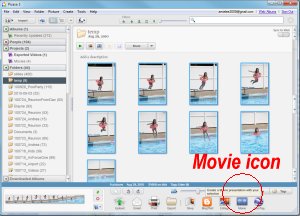 |
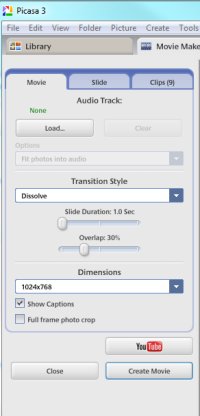
| For Transition Style, I chose Disolve.
For Slide Duration, I chose 1.0 second. You can choose a longer time which lets you study each frame more, but I prefer the shorter duration which makes the action seem to flow more naturally.
For Overlap, I chose 100%. For the diving action, this setting seems to provide the best effect.
Then I click on the Create Movie button. This converts the 9 individual frames into a short movie. |
 |
In just a few seconds, Picasa turns the images into a short movie with which you can enjoy the action with others. Click here to see the movie.
Yes, you can have a fun using the camera’s continuous shooting mode. But sharing the action with the world makes the fun last much longer.
* Picasa is available for the PC and Mac by free download from Google.


