Wedding & Portrait Photographers International Convention – Part 1
February 21, 2011

The WPPI holds its annual convention here in Las Vegas. My original plan was to fly here from Grand Rapids on Sunday. But the weather man kept telling me that Sunday was going to be a no-no because of the umteenth snow storm that was closing in on the midwest. So I rescheduled my flight and arrived here late Saturday and beat the foot of snow that closed highways, schools and activities.
The convention started on February 17 and runs through February 24th. There are two parts to the convention.
- the first part are dozens of seminars led by some of the best names in the wedding and portrait photography business. Many of these professionals are versed in the creative styling, equipment selection, lighting techniques, printing selection and workflow while others are experts in the selling, advertising, promotion and business end too. I counted more than 100 different seminars with diverse titles as: “The Art of Light and Motion”, “Lightroom – step by step workflow for beginners”, “Winning Marketing Strategies”, “High Fashion Meets Wedding”, “The Power of Video Marketing” and “Your Wedding Business from Scratch to Success”.
- The second part of the convention is the trade show with more than 300 exhibitors including the major camera, lighting and photo printer services.
The WPPI management was predicting 13,000 attendees – an impressive number mostly owing to a very full and robust set of seminars. The high attendance suggests that these individuals understand the importance of investing in their profession.
Today I spent some time at the trade show. Here’s a few of the exhibitors with whom I stopped to talk about their products.
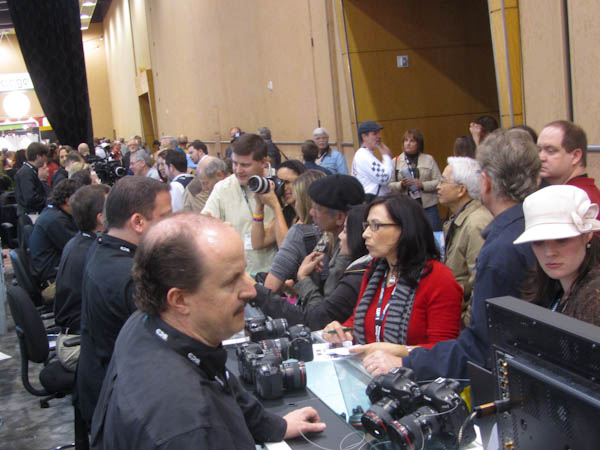
| Here’s a look at some of the attendees crowding around one of the camera manufacturers booth. The major camera makers were there: Canon, Fuji, Leica, Nikon, Panasonic, Sigma and Sony.
There were also dozens of lighting manufacturers, makers of camera bags and backpacks, tripods, backdrops, wireless flash syncs and printers. In full force were photo printing services. With so many wedding and portrait photographers attending, they were keen to show them the huge range of photo services offered. |
 |
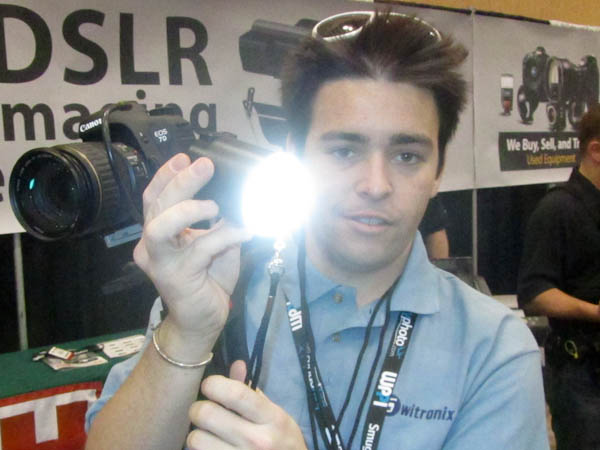
| Most of the recent cameras can now capture video. Switronix showed me this portable LED that provides lthe equivalent of 50 watts of daylight balanced lighting. This is the TL-50 and includes rechargeable NiMH batteries which can power the LED for an amazing 3 hours.
Dave was handholding the TL-50, but the unit is lightweight and conveniently mounts on the flash shoe. Price is about $250. For more information, contact Switronix. |
 |
| For portable flash units, LumiQuest makes several models of diffusers and bounce devices. Here Heidi is showing me the company’s most popular model, the Softbox III. To use it, you unfold the 8″ x 9″ flat package to this shape and attached it to the flash with velcro straps.
I found that the unit was very study and can be used on-camera or off-camera. Price is about $45. For more information, contact LumiQuest. |
 |
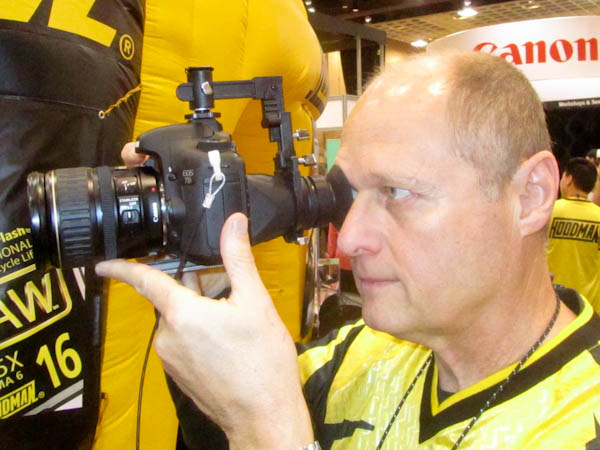
| At the Hoodman booth, I had a demo of their Cinema Kit Pro. Designed especially for the videographers, the mounting bracket sits on the flash shoe and swings up and down to provide a magnified view of the LCD without any reflection or interference from sun or room light.
If you have trouble seeing the LCD as you capture videos, this device makes it easy to monitor the detail. Price is about $180. For more information, contact Hoodman. |
 |
| Epson had many of their professional line of printers on display.
I had my eye on the new Epson 4900. The printer was spewing out gorgeous samples of 17″ wide photos and uses ten color cartridges. Designed especially for high quality, professional applications, the printer includes an in-line X-Rite SpectroProofer for exacting color management. Price for the 4990 is about is about $2500. For more information, contact Epson. |
 |
I’ll have more news from the show shortly.
Written by Arnie Lee