Landscape Tip #2

Most of us have scrapbooks filled with landscape photos. These pictures are a great way to extend your vacation memories and to show off your worldly travels. Taking great landscapes is not magic. While there are no right or wrong ways to take pictures, below are a few tips that suggest alternative ways to frame your landscapes.

Step Up

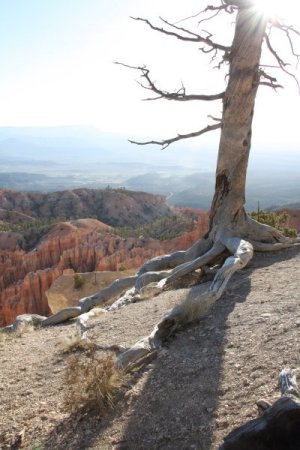
Here’s an indirect landscape shot.

In this example, the photographer has made the tree into the main subject while the mountains are still clearly visible.

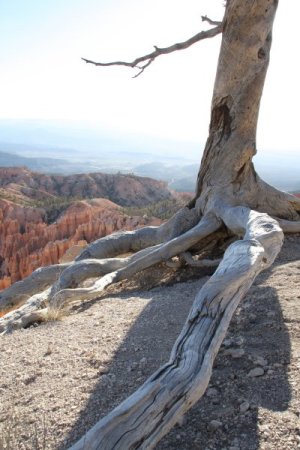
To further make the tree more interesting, he moved closer to exaggerate the large tree root. The red mountains are still visible.

Posted in landscapes, tips | Tagged , , | Comments Off on Landscape Tip #2

Can’t I Fix it in Photoshop?

A common belief among users of digital cameras is that if an image isn’t captured perfectly, it can be fixed with software. Yes, there are plenty of competent software packages that can perform magic on images that are in need of help.

I’ve been “saved” more than a few times by Photoshop (or Photoshop Elements, PaintShop Pro and Picassa too). But the idea that I can “fix it in Photoshop” should not be a license for me to practice lazy camera techniques.

Today’s digital cameras have a vast array of adjustments for capturing quality photographs under a wide variety of lighting conditions. Adjusting the camera for the best capture produces a better image than a sub-optimal capture that has to be fixed by software post-processing. Starting with a properly exposed image directly from camera should be the goal, even if you choose to enhance the color, tweak the contrast or lighten the shadows with software afterwards.

Posted in photoshop | Tagged , | Comments Off on Can’t I Fix it in Photoshop?

Kids Tip #2

Taking pictures of kids is one of the most popular uses for digital cameras. From time to time, we’ll present tips for taking better kids pictures.

Move in Close
Many times, when you first see a “picture moment”, you’re tempted to take the picture quickly so as not to disturb the subject.

The result is often a “microscopic” picture of your subject similar to the snapshot above. The size of the toddler is so small as to make it difficult to pick out her face.

By moving in closer, we’re able to see much more detail of the same toddler. It takes only a few steps to “enlarge” the photo. I call this zooming with my feet.

Posted in kids, tips | Tagged , , , | Comments Off on Kids Tip #2